
More agents. One focus.
Ship more code. Spend less time managing agents.
MAICA collects the decisions your coding agents need from you, coordinates development tasks and helps you verify what they deliver. Get more done in parallel without hopping between terminals.
- Fewer interruptions
- Control over parallel agents
- Verified results, not agent claims
For Claude Code and Codex · Local-first · macOS · private beta
Your agents work in parallel.
Your attention doesn’t have to.
Without MAICA
- You watch several terminals yourself
- You keep asking agents where they are
- You handle questions and approvals one by one
- You dig up results and test runs yourself
- You coordinate development tasks by hand
With MAICA
- Every decision that matters in one place
- See at a glance which agent needs you
- Structured Plan & Build workflows
- Acceptance criteria and evidence you can check
- Less time lost to avoidable coordination
Here is what that looks like.
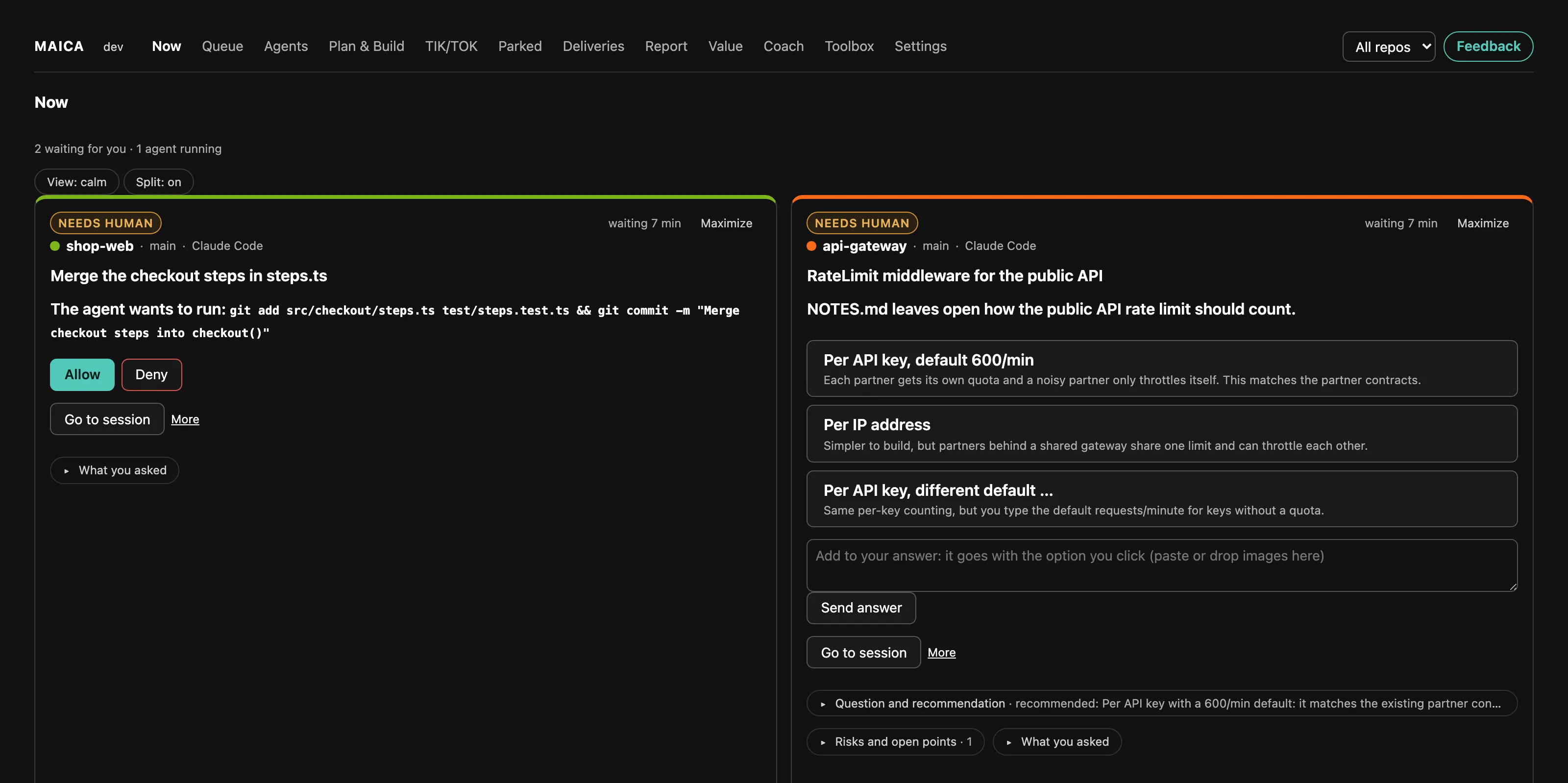
See which agent needs you. Decide on the spot.
One session wants to commit, another needs an architecture call. You answer both right here, with the agent’s context and recommendation, and both get back to work.
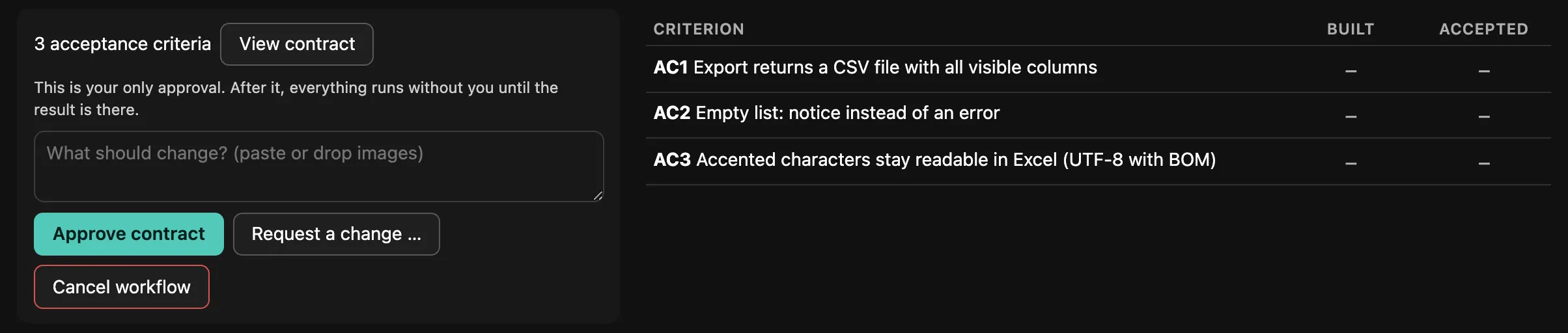
Turn a goal into a verified delivery.
A planner writes the contract with acceptance criteria and you approve it once. A separate implementer builds it, and the planner accepts each criterion only with evidence.


Try MAICA with your own Claude Code and Codex sessions.
Request beta accessTwo ways of working.
One place for your decisions.
Your sessions keep running. MAICA tells you where you are needed.
- Start Claude Code and Codex as usual; MAICA follows along locally
- Approvals, questions, failures and finished rounds land in Now
- Answer right from MAICA, or jump back into the session in one click
You set the goal. MAICA coordinates planner and implementer.
- Start from a free-text goal or a GitHub issue
- One approval from you, then the work runs until the result
- No push, no release, and a merge only on your click
- YouGoalFree text or a GitHub issue.
- PlannerPlanningContract with acceptance criteria. Changes no code.
- YouApprovalApprove, change or cancel.
- ImplementerBuildOwn branch and worktree, up to three helpers.
- PlannerVerificationEvery criterion with evidence, at most three rounds.
- YouResultReport and evidence folder. You decide on the merge.
MAICA does not replace Claude Code or Codex and is not an IDE. It starts sessions of its own only for a Plan & Build workflow; the roles run as Claude Code sessions in tmux.
Done means proven.
Not claimed.
Acceptance criteria and evidence
Every criterion shows what was built and what was accepted. An acceptance needs an evidence file, such as test output or a screenshot. Even in a simple task run, a task only counts as done with evidence.
Independent review TIK/TOK, optional
One agent implements, a second reviews independently, on a different model if you like: Claude builds, Codex reviews. Per criterion you see whether a result was executed, only inspected or only claimed.
Controlled approvals
MAICA allows nothing on its own. Permission requests arrive as a card with context, and you decide. For safe commands from a fixed list, “Always allow here” adds a rule when you click it. Taking more routine approvals off your plate is an area we are actively working on.
Coach and Kanari
The coach shows what holds up your rounds most often and suggests a matching prompt. Kanari detects, heuristically, when a session has lost its context and recommends a fresh one.
See what your agents actually did.
The report shows agent runtime and concurrency, how often agents waited for you, how many approvals and decisions went through MAICA, and how many check runs passed. Work times are labelled as estimates. MAICA deliberately shows no “productivity factor”: there is no reliable method for one yet.
Your code is not the product.
What MAICA processes
Your sessions’ events and transcripts, stored locally, with the UI on 127.0.0.1 only. MAICA sends no code, prompts, contracts or evidence to any server of ours.
What your tools send
Claude Code and Codex send to Anthropic or OpenAI as always, on your accounts, Plan & Build included. Only if you set them up: GitHub issues via your own read-only token, phone notifications via ntfy without question text.
What reaches us
The opt-in beta benchmark: weekly numbers under a random ID, never code or names. Feedback only when you send it. The update check with GitHub can be switched off.
Details and how to withdraw (in German): MAICA beta privacy.
Works where your agents already run.
| Claude Code in the terminal | Supported |
|---|---|
| Claude Code in the Claude desktop app | Supported Go to session cannot open one specific session in the app. |
| Codex CLI in the terminal | Supported |
| Codex desktop app | Not supported It keeps its sessions to itself, so MAICA cannot see them. |
| Plan & Build | Supported Planner and implementer run as Claude Code sessions in tmux. Codex can review in TIK/TOK. |
| macOS | Tested platform |
| Linux, Windows | Not verified yet |
Separate terminals, tmux panes, iTerm2 tabs and git worktrees stay as they are. MAICA needs Node.js 22.18 or newer, Plan & Build also needs tmux.
What developers ask about MAICA
Does MAICA start agents itself, or does it only watch?
Both, depending on how you work. Sessions you start yourself, MAICA only watches. For a Plan & Build workflow, MAICA starts and coordinates its own sessions: a planner and an implementer. MAICA does not replace Claude Code or Codex and is not an IDE.
Is Plan & Build fully autonomous?
No, on purpose. You approve the contract once; after that the implementer and the planner work without asking you, with at most three review rounds. Anything only you can resolve comes to you as a card. That does not make the result bug-free, but every acceptance is backed by evidence you can check.
What does Plan & Build do to my repository?
The implementer works on its own branch in its own git worktree, the planner without write access to the code. Your main checkout stays untouched. MAICA never pushes or deploys. A merge happens only when you do it yourself or explicitly start it from a card in MAICA. To start from a GitHub issue, MAICA reads it with its own read-only token and writes nothing back.
Does MAICA work with the Claude and Codex desktop apps?
Claude Code in the Claude desktop app: yes, but MAICA cannot jump to one specific session inside the app. The Codex desktop app: no, it keeps its sessions to itself. Codex in the terminal (the codex CLI) is fully supported.
Does MAICA work with tmux and git worktrees?
Yes. Sessions in terminals, tmux panes or worktrees stay where they are, and MAICA takes you back to the right one. Plan & Build requires tmux, because its roles run there.
What data leaves my machine?
MAICA itself sends no code, prompts or conversations to us. Your agents send to Anthropic or OpenAI as they always do. What reaches us is the beta benchmark if you opt in, and feedback you send yourself.
Run more agents.
Keep one focus.
MAICA is in private beta with external testers. Request access if you already run several Claude Code or Codex sessions at once, or want to hand agents tasks with real acceptance.
Not a fit yet if you are looking for an enterprise rollout, fully autonomous agents without human approval, or a replacement for your IDE.
Only name and email are required. I will get back to you personally.
No pricing yet: MAICA is not commercially released. Docs and the issue tracker for testers are public on GitHub.